AI trading assistants can be useful when they slow a trader down. A good assistant can summarize source material, turn a messy idea into a checklist, explain an option-chain term, or help a trader compare what they planned to do with what the order ticket actually says.
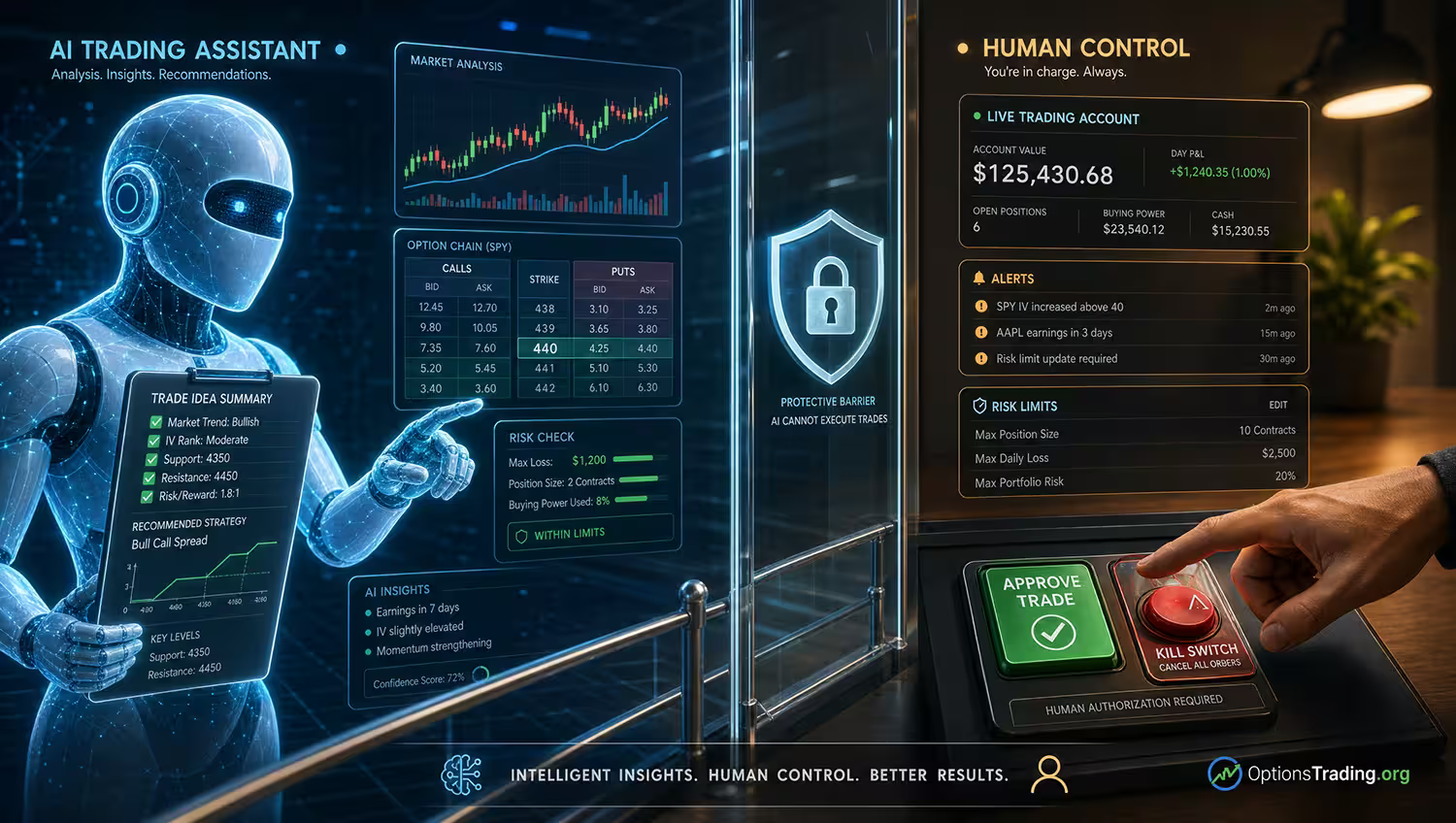
The danger starts when the assistant quietly moves from organizing research to controlling the account. Options trading is not only a writing problem or a data problem. It is also an account access, order control, position size, liquidity, expiration, and human approval problem.
As of June 5, 2026, official investor-protection sources are still warning readers about AI trading-bot claims, AI investment fraud, and auto-trading services. That does not mean every AI tool is bad. It means the trader needs a hard boundary between useful assistance and software that can damage an account before a human has reviewed the trade.
AI Assistant Is Not Account Authority
An AI trading assistant should be treated as decision support. It can help organize a trade thesis, summarize a source, draft a risk checklist, or explain why an option premium might include time value, volatility, and liquidity costs.
Account authority is different. Account authority means the software can access credentials, read or change positions, stage an order, size a trade, submit an order, cancel an order, or replace an order. That is a much higher-risk layer than asking a tool to explain a concept.
Readers comparing tools can use this overview of AI-powered tools for options trading as a starting point, but tool selection should come after the permission boundary is clear. A useful AI trading workflow begins with what the assistant is not allowed to do.
Quick Takeaways
- Use AI trading assistants for research organization, not final trade authority.
- Keep account access, order control, and position size under direct human approval.
- Do not let an assistant use market orders, change order fields, or route trades without review.
- Require source checks for market claims, tool claims, and any performance claims.
- Use read-only access, logs, limits, alerts, and a kill switch before any software gets near a live account.
- Treat AI output as a draft that must be checked against the option chain, broker platform, and risk plan.
Safe Tasks And Unsafe Tasks
The practical question is not whether AI belongs in the workflow. It is where the assistant stops. The safest use cases improve preparation while leaving the trade decision, order ticket, and final approval with the human.
Assistant Task | Useful If | Unsafe If |
|---|---|---|
Summarizing sources | The assistant gives a plain-language summary and keeps links or citations visible. | It turns a summary into a buy, sell, or hold instruction. |
Drafting a pre-trade checklist | The checklist reminds the trader to review premium, expiration, liquidity, assignment, and max loss. | The checklist becomes a substitute for reading the actual option chain and account screen. |
Explaining an option strategy | The explanation names mechanics, trade-offs, and risks without promising outcomes. | The assistant says the setup is suitable or low risk for a specific account. |
Building a hypothetical order ticket | Every field is clearly labeled as a draft for human review. | The assistant can change strike, expiration, order type, quantity, or route without approval. |
Monitoring a watchlist | It flags items for review and shows the source, timestamp, and reason. | It automatically enters trades because a threshold, headline, or sentiment score changed. |
Account Firebreaks Before Order Entry
A firebreak is a control that stops a small mistake from spreading. In an AI-assisted options workflow, the first firebreak is account access. The assistant should not store login credentials, pull full account data without a clear reason, or receive trading permissions before the trader understands exactly what the software can do.
The second firebreak is order control. If an assistant drafts a trade, the draft should be separated from the live order ticket. The trader should still choose the contract, quantity, order type, limit price, open-close instruction, time in force, and exit plan. This is where a review of options order types is more useful than a confident paragraph from a model.
The third firebreak is size. Position size should come from a written risk limit, not from how convincing the assistant sounds. A tool should not increase contracts, widen a spread, shorten the expiration, or switch from a defined-risk idea to an undefined-risk idea because the language in the prompt sounds urgent.
The fourth firebreak is platform control. Readers comparing active trader options platforms should look for order previews, alerts, cancel workflows, permission settings, position-risk views, and clear audit trails. A stronger platform does not make a weak process safe, but it gives the human more places to catch errors before money leaves the account.
The final firebreak is a kill switch. If a data feed breaks, the assistant misunderstands a ticker, a prompt injects a bad instruction, or the market moves too quickly, the trader needs a way to stop the workflow immediately. A system that cannot be paused, audited, and shut down does not belong near live options orders.
A Human-Approval Receipt
A useful assistant can produce a receipt before a trader acts. The receipt is not a recommendation. It is a compact record of what the assistant found, what the human checked, and what would invalidate the idea.
Receipt Field | What The Assistant Can Draft | What The Human Must Confirm |
|---|---|---|
Source check | List the source, publication date, and what claim it supports. | The source is real, current enough, and relevant to the option being reviewed. |
Option-chain snapshot | Record the underlying price, strike, expiration, bid, ask, midpoint, volume, and open interest. | The data matches the broker platform and has not gone stale. |
Order draft | Label buy/sell, open/close, quantity, order type, limit price, and time in force. | The order fields match the trader’s actual intent and account approval level. |
Risk limit | State maximum planned loss, planned exit, and the reason the trade would be rejected. | The position size fits the account limit before commissions, fees, and slippage. |
Human approval | Ask for a clear approve, revise, or reject decision. | No live order is sent until the trader has reviewed the ticket and chosen to proceed. |
How AI Assistants Can Wreck An Account
- They hallucinate a source, ticker, expiration, strike, or rule and the trader does not notice.
- They summarize stale market context as if it were current.
- They draft the wrong open-close instruction or turn a closing idea into a new position.
- They use a market order in a contract where the bid-ask spread is wide.
- They increase position size because the answer sounds confident.
- They ignore assignment, exercise, margin, buying power, or broker-approval constraints.
- They expose account access, API keys, prompts, trade notes, or personal information to a vendor the trader has not reviewed.
- They make a scam sound professional by wrapping unsupported profit claims in AI language.
- They do not keep logs, so the trader cannot reconstruct why an order was drafted or changed.
- They cannot be stopped quickly when data, prompts, or market conditions change.
Where The Assistant Can Actually Help
The best AI assistant use cases are usually boring in a good way. Ask it to summarize an OCC or FINRA education page, then ask it to separate what is sourced from what is interpretation. Ask it to list the assumptions in a trade idea, then check those assumptions against the platform.
It can also help with journaling. A trader can paste their own notes, remove sensitive account information, and ask the assistant to identify whether the original thesis, risk limit, and exit rule were clear. That can improve process quality without asking the assistant to predict the next price move.
Another useful task is contradiction hunting. A trader can ask, ‘What would make this trade wrong?’ or ‘What did I fail to verify?’ The answer may not be perfect, but it can create structured friction. That friction is valuable because many options mistakes happen when a trader moves from idea to order ticket too quickly.
The assistant can also make education more accessible. It can explain why implied volatility, time decay, bid-ask spreads, and expiration interact differently from a stock trade. But after the explanation, the trader still has to apply real account limits and understand the options risks before considering any live order.
A Simple Options Assistant Scenario
Imagine a trader is considering a 30-day call option after a stock drops on a headline. The assistant says the shares could rebound, identifies a nearby call, and drafts a short explanation. That output is not enough. The trader still needs to ask whether the option is liquid, whether implied volatility is elevated, whether the breakeven is realistic, and whether the position size is small enough to lose without changing the account plan.
A safer assistant would produce a trade packet instead of a trade instruction. The packet might say: source checked, headline dated, option-chain snapshot recorded, bid-ask spread reviewed, max loss stated, limit order required, no market order, and human approval needed before entry. It might also include a rejection rule such as, ‘Do not enter if the spread is wider than planned or the option price rises above the limit.’
That workflow does not guarantee a profitable trade. It does something more modest and more useful: it keeps the assistant from bypassing the trader’s own process. The account remains protected by review steps instead of exposed to a fluent answer.
AI Assistant Review Checklist
- The assistant is limited to research, organization, education, journaling, or draft preparation.
- No account credentials, API keys, or sensitive trade notes are shared unless the vendor and permissions have been reviewed.
- The assistant cannot route, cancel, replace, or change an order without human approval.
- Every order ticket shows underlying, strategy, buy/sell, open/close, quantity, strike, expiration, order type, limit price, and time in force.
- Position size comes from a written risk limit, not model confidence or prompt language.
- The option-chain data includes a timestamp and is checked against the broker platform before use.
- Bid-ask spread, volume, open interest, expiration, assignment, exercise, and margin considerations are reviewed when relevant.
- The workflow keeps logs of prompts, source links, assumptions, draft orders, human decisions, and changes.
- The trader knows how to pause, revoke permissions, cancel staged orders, and activate a kill switch.
- Any AI tool or auto-trading service making performance claims is checked against current investor-protection warnings before trust is granted.
What To Check Before Trusting The Tool
Before using an assistant in an options workflow, review who operates the tool, what data it can see, whether prompts are retained, whether the service trains on user content, what account permissions are requested, and whether the company makes performance claims. The more account access the tool requests, the more evidence and caution the trader should require.
Be especially careful with tools that promise hands-off profits, secret AI signals, guaranteed income, or urgent access before a deadline. A serious tool should make limitations visible. It should not need to hide risk disclosures, registration status, fee details, or how orders are handled.
A reasonable first step is paper review. Let the assistant draft checklists, explain scenarios, or organize journal notes, then compare the output with the real platform without entering a trade. If the tool cannot handle that lower-risk task cleanly, it has no business touching live orders.
FAQ
These questions focus on AI trading assistants as workflow tools for options education and review, not as recommendations to trade or automate.
Should an AI trading assistant ever have access to my brokerage account?
Most readers should start with no brokerage access or read-only workflows. Any tool that requests account access should be reviewed for permissions, data use, vendor credibility, logs, security, and whether the trader can revoke access immediately.
Can an AI assistant help me find options trades?
It can help organize research, explain mechanics, and list checks. It should not be treated as a reliable trade picker or prediction engine. The trader still needs to verify sources, option-chain data, liquidity, account fit, and risk.
What is the safest first use?
Use the assistant for education, checklist drafting, and paper review. Keep it away from credentials, order routing, and live position changes until the workflow has clear permissions, human approval, logs, and a kill switch.
What is the biggest warning sign?
Be wary of any service that promises easy profits, secret signals, guaranteed returns, or hands-off auto-trading. AI language can make weak claims sound sophisticated, so performance claims and account-access requests deserve extra skepticism.
Can AI reduce options-trading mistakes?
It can reduce some process mistakes if used as structured friction. It can also create new mistakes if the trader overtrusts it. The safer goal is better review, not automatic confidence.
Keep The Assistant Out Of The Driver’s Seat
AI trading assistants can make options research cleaner, faster, and more organized. They can also make a weak process faster in the wrong direction. The difference is control.
A strong workflow keeps the assistant in the passenger seat: helpful for notes, checklists, source summaries, and draft review, but unable to size trades, change orders, or touch the account without explicit human approval. The trader remains responsible for the option contract, the order ticket, the risk limit, and the decision to do nothing.
Sources Used For AI Assistant Risk Context
Current context was checked as of July [june] against the CFTC advisory on AI trading bots, Investor.gov’s alert on artificial intelligence fraud, FINRA’s investor guidance on AI and investment fraud, FINRA’s warning on auto-trading services offered by unregistered entities, FINRA Regulatory Notice 24-09, and FINRA’s options education. Recheck tool claims, account-permission details, vendor terms, and any live options examples during final editorial review.